


 ألمانيا
 ماليزيا
 تركيا
تركيا مصر
مصر المملكة المتحدة
 مملكة البحرين






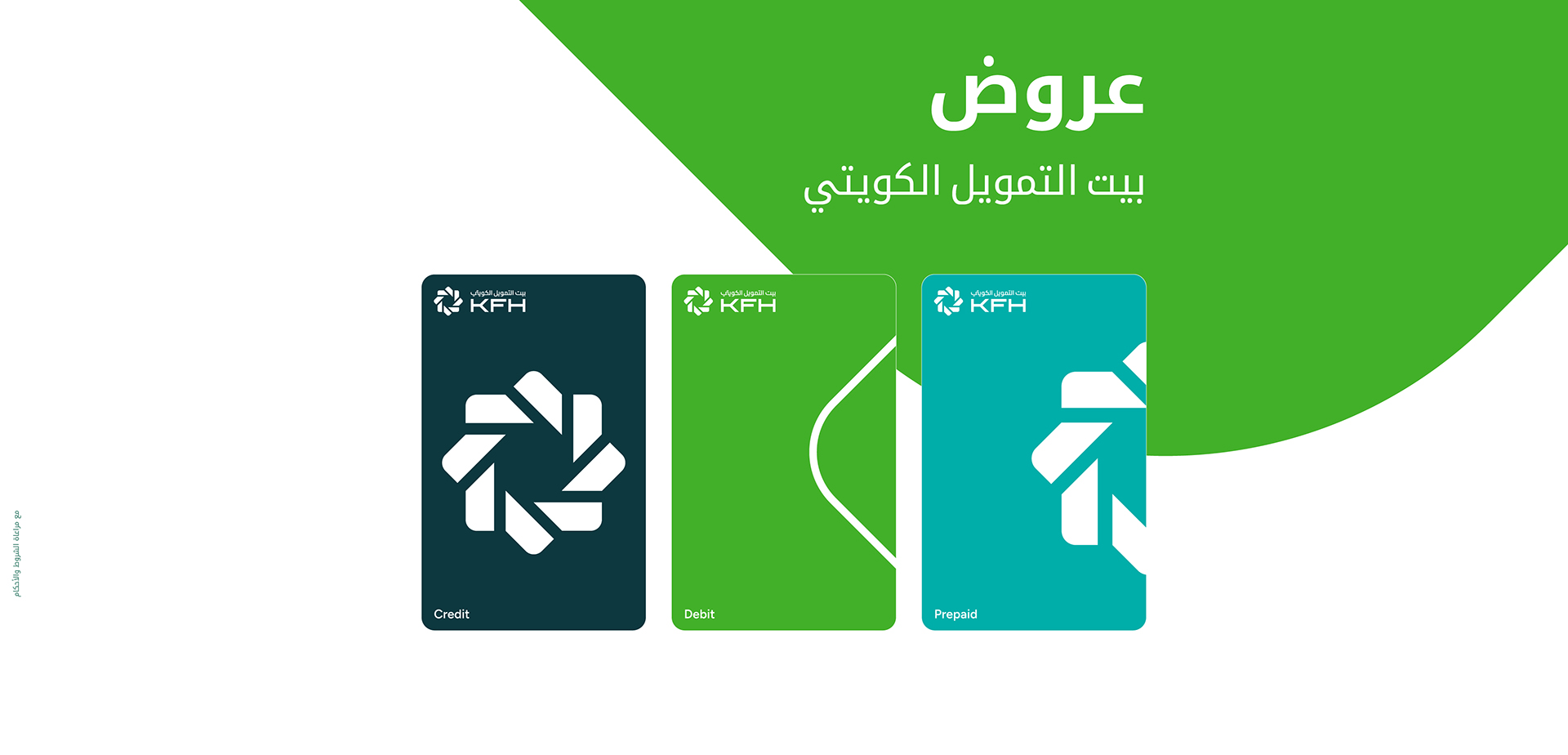






بطاقة المكافآت
بطاقة المكافآت من بيت التمويل الكويتي المسبقة الدفع تعتبر من ضمن برنامج المكافآت الخاص ببيت التمويل الكويتي حيث يتمكن العميل من كسب 10 نقاط عند الشراء بقيمة 1 د.ك عند استخدامه البطاقة على جميع المشتريات محلياً ودولياً بالاضافة للحصول على 1,000 نقطة ترحيبية عند إصدار البطاقة.

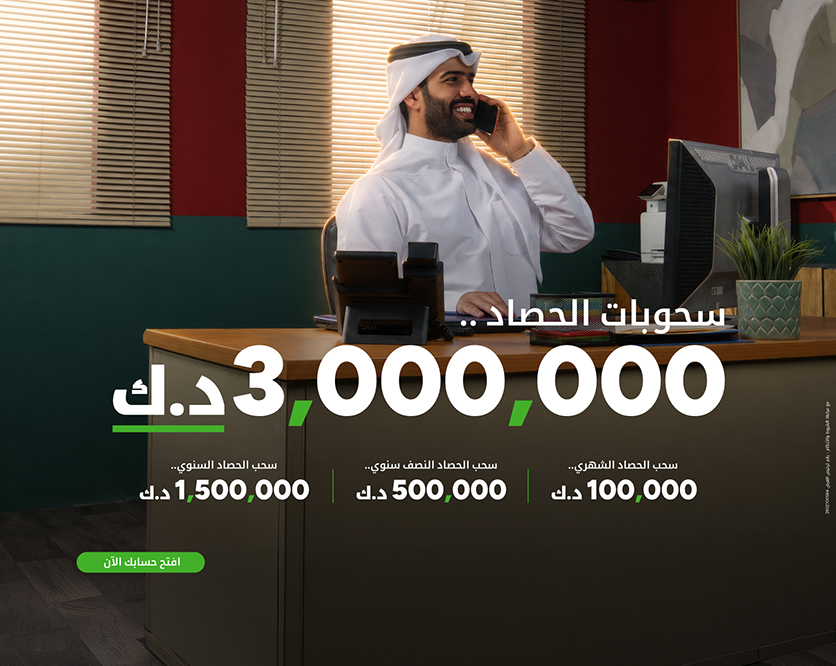
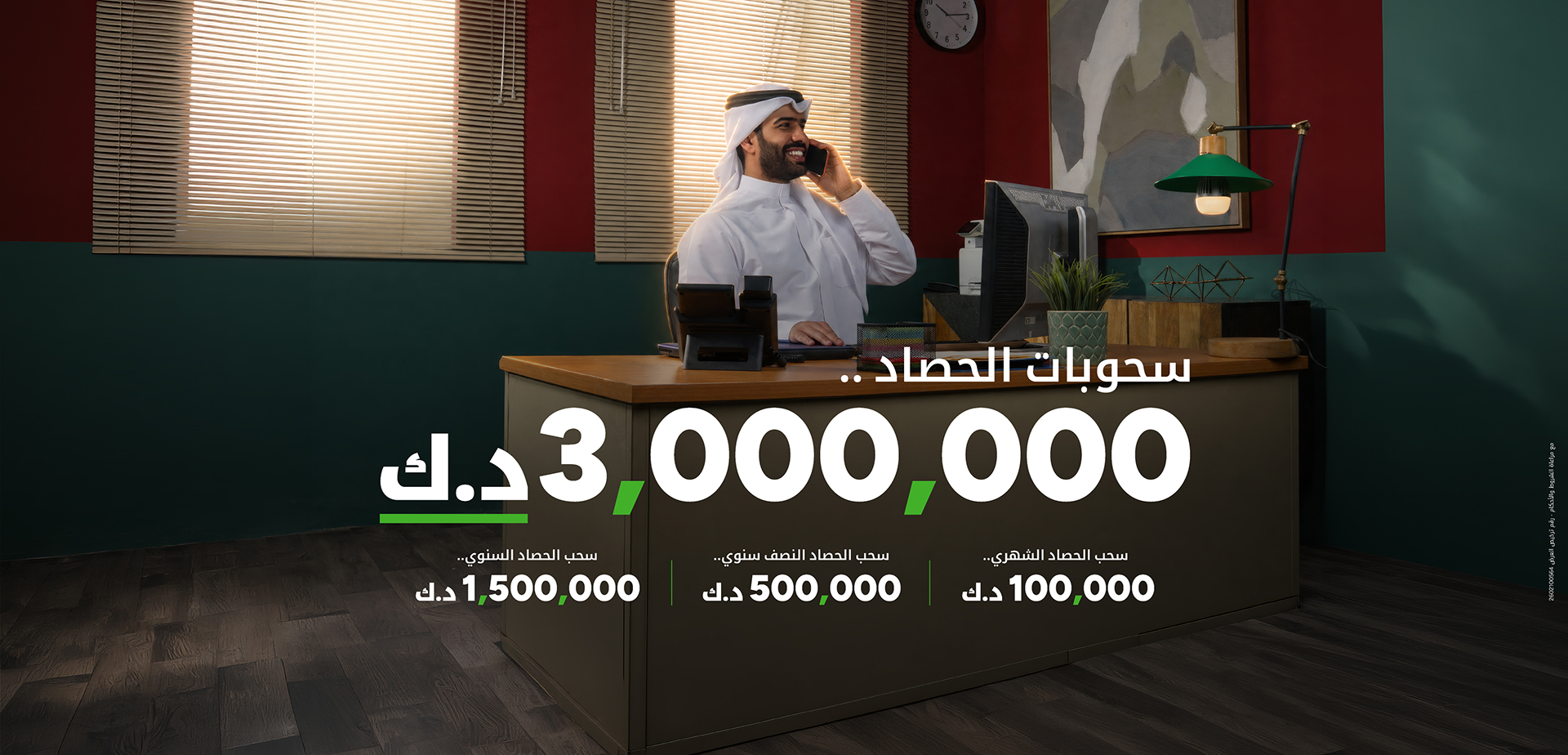
حساب الحصاد
استثمر في حساب الحصاد واحصل على فرص لدخول السحوبات الشهرية، النصف سنوية، والسنوية
تطبيق "KFHOnline"

- تحويلات محلية وعالمية
- فتح حسابات وودائع
- بطاقات افتراضية فورية
- شراء وبيع الذهب
- سحب وإيداع بدون بطاقة
- طلب وارسال أموال
 امسح رمز الQR









أخبارنا..
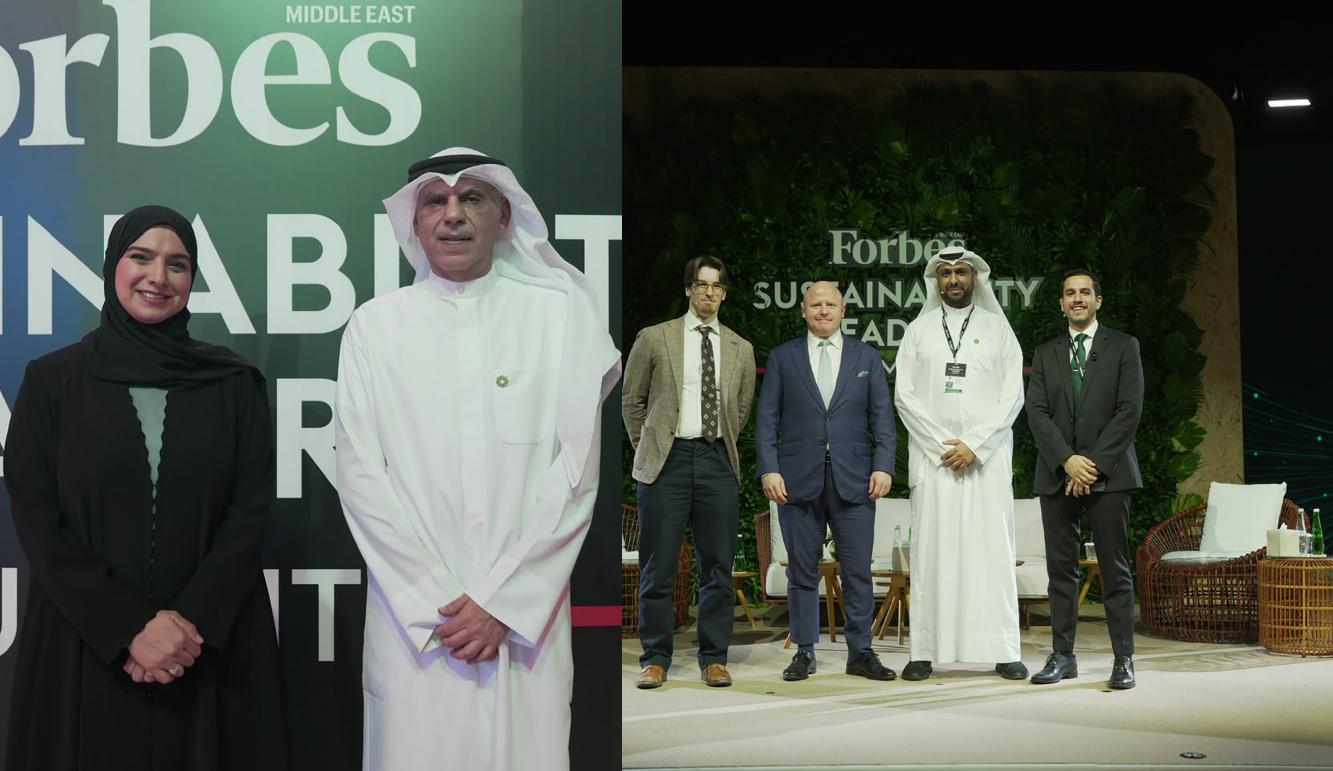
بيت التمويل الكويتي يستعرض ريادته في التمويل المستدام وتطبيق معايير الـESG خلال قمة فوربس لقادة الاستدامة 2026
شارك بيت التمويل الكويتي في قمة فوربس لقادة الاستدامة لعام 2026 تحت شعار "المرونة من أجل مستقبل مستدام". وجمعت القمة التي أقيمت في مدينة أبوظبي، تحت رعاية الدكتورة آمنة بنت عبدالله الضحاك، وزيرة التغير المناخي والبيئة في دولة الإمارات العربية المتحدة، نخبة من قادة الفكر وصناع القرار وخبراء القطاع لمناقشة استراتيجيات التعامل مع التحديات، وتسريع الابتكار، ودفع عجلة النمو المستدام في القطاعات الحيوية، بما في ذلك الطاقة، والذكاء الاصطناعي، والاستثمار، ورأس المال الطبيعي، واستعداد الكوادر البشرية. وتعكس مشاركة بيت التمويل الكويتي، المتمثلة برئيس الالتزام والحوكمة للمجموعة في بيت التمويل الكويتي، مشعل الشايع، والمدير التنفيذي للحوكمة والاستدامة في بيت التمويل الكويتي، محمد العربيد، مدى التزامه بالتمويل المستدام والنمو المسؤول، إلى جانب تسليط الضوء على دور التمويل الإسلامي في دعم التنمية المستدامة من خلال حلول متوافقة مع الشريعة الإسلامية. كما أتاحت القمة الفرصة أمام بيت التمويل الكويتي لتبادل الرؤى مع رواد القطاع حول أفضل الممارسات المتبعة في مجال الاستدامة، وتعزيز نهجه في المعايير البيئية والاجتماعية وحوكمة الشركات (ESG)، وترسيخ مكانته كرائد في مجال التمويل المستدام وتحقيق القيمة طويلة الأمد. وشارك المدير التنفيذي للحوكمة والاستدامة في بيت التمويل الكويتي، محمد العربيد، في حلقة نقاشية بعنوان "تبادل التمويل المستدام: من الالتزامات إلى رأس المال"، تم خلالها تسليط الضوء على دور رأس المال المدفوع بهدف في تسريع وتيرة الابتكار المناخي، وتمكين الشركات الصغيرة والمتوسطة، إلى جانب توليد قيمة اقتصادية واجتماعية على المدى الطويل. خلال الجلسة، أكد العربيد الدور الحيوي الذي تقوم به البنوك في الربط بين رأس المال والاقتصاد الحقيقي من خلال توجيه التمويل نحو مبادرات التنمية المستدامة، مشيراً إلى أن المؤسسات المالية في دول مجلس التعاون الخليجي مؤهلة لدعم النمو المستدام على مستوى واسع وذلك من خلال الاستثمار في الطاقة المتجددة والبنية التحتية والتقنيات منخفضة الكربون والمشاريع الأخرى التي من شأنها تعزيز المرونة الاقتصادية والمسؤولية البيئية. كما سلط العربيد الضوء على التوافق التام بين التمويل الإسلامي ومبادئ الاستدامة، مشيراً إلى أن طبيعة التمويل الإسلامي المدعوم بالأصول تشجع على الاستثمار المسؤول وتربط التمويل بالنشاط الاقتصادي الحقيقي. وأضاف أن بيت التمويل الكويتي يواصل دمج معايير الاستدامة في منتجاته وخدماته، مستفيداً من التمويل الإسلامي كمحرك أساسي لتوليد قيمة طويلة الأمد وتحقيق التنمية المستدامة. وشدد على أن الحوكمة القوية والشفافية تشكلان ركيزتين أساسيتين لبناء الثقة وتعزيز التمويل المستدام، مشيراً إلى أن تعزيز أطر الحوكمة وممارسات الإفصاح سيؤدي دوراً محورياً في تسريع وتيرة التمويل المستدام في جميع أنحاء المنطقة. وأشار العربيد إلى أن مجموعة بيت التمويل الكويتي وسّعت استثماراتها في صكوك الاستدامة إلى نحو 2.38 مليار دولار في 2025، بما يعكس الدور القيادي في التمويل المستدام في أسواق التمويل الإسلامي. وأضاف أن حجم استثمارات بيت التمويل الكويتي في الصكوك المستدامة والخضراء ارتفع إلى نحو 1.2 مليار دولار خلال 2025، بنمو سنوي بلغ 30.7 في المئة، مقارنة بـ 2024. وتوزعت هذه الاستثمارات بواقع 44 في المئة في الصكوك المستدامة، و56 في المئة في الصكوك الخضراء. وأكد العربيد أن بيت التمويل الكويتي يمضي بتنفيذ خطة للاستدامة البيئية والاجتماعية والحوكمة (ESG) تستهدف تحقيق الحياد الكربوني لعملياته التشغيلية بحلول عام 2060، مدعومة بخارطة طريق تنفيذية للفترة 2025-2030. ويواصل بيت التمويل الكويتي تحقيق إسهامات بارزة في مجال الاستدامة وأداء معايير (ESG)، إذ تستحوذ المجموعة على تصنيف "A" ضمن مؤشر (MSCI ESG)، عدا عن كونها مدرجة ضمن سلسلة مؤشرات (FTSE4Good)، تقديراً لالتزامها بأفضل الممارسات البيئية والاجتماعية والحوكمة والتمويل المستدام. كما حصل معرض KFH Auto على شهادة تقييم الاستدامة GSAS المستوى الذهبي، ليصبح أول معرض سيارات صديق للبيئة يلتزم بالكامل بمعايير الاستدامة في الكويت. وفي إطار جهوده للارتقاء بالاستدامة، وقع بيت التمويل الكويتي مذكرة تفاهم مع برنامج الأمم المتحدة الإنمائي (UNDP)، وأطلق أول برنامج مخصص للشركات الصغيرة والمتوسطة تحت عنوان" النمو باستدامة"، بهدف مساعدة هذه المشروعات على تعزيز تنافسيتها وتحقيق نمو مستدام. علاوة على ما سبق، يواصل البنك أيضاً مبادرته الرائدة (Keep It Green)، التي تستهدف الحفاظ على البيئة والحد من انبعاثات الكربون. ويُعد بيت التمويل الكويتي السبّاق محلياً في إصدار تقارير قياس الأثر، مواصلاً ريادته في مجال إعداد تقارير الاستدامة من خلال نشر تقريره السنوي للاستدامة وتقرير البصمة الكربونية، اللذين يستعرضان أداءه البيئي، وإنجازاته، وخارطة طريقه نحو مستقبل أقل انبعاثاً للكربون.
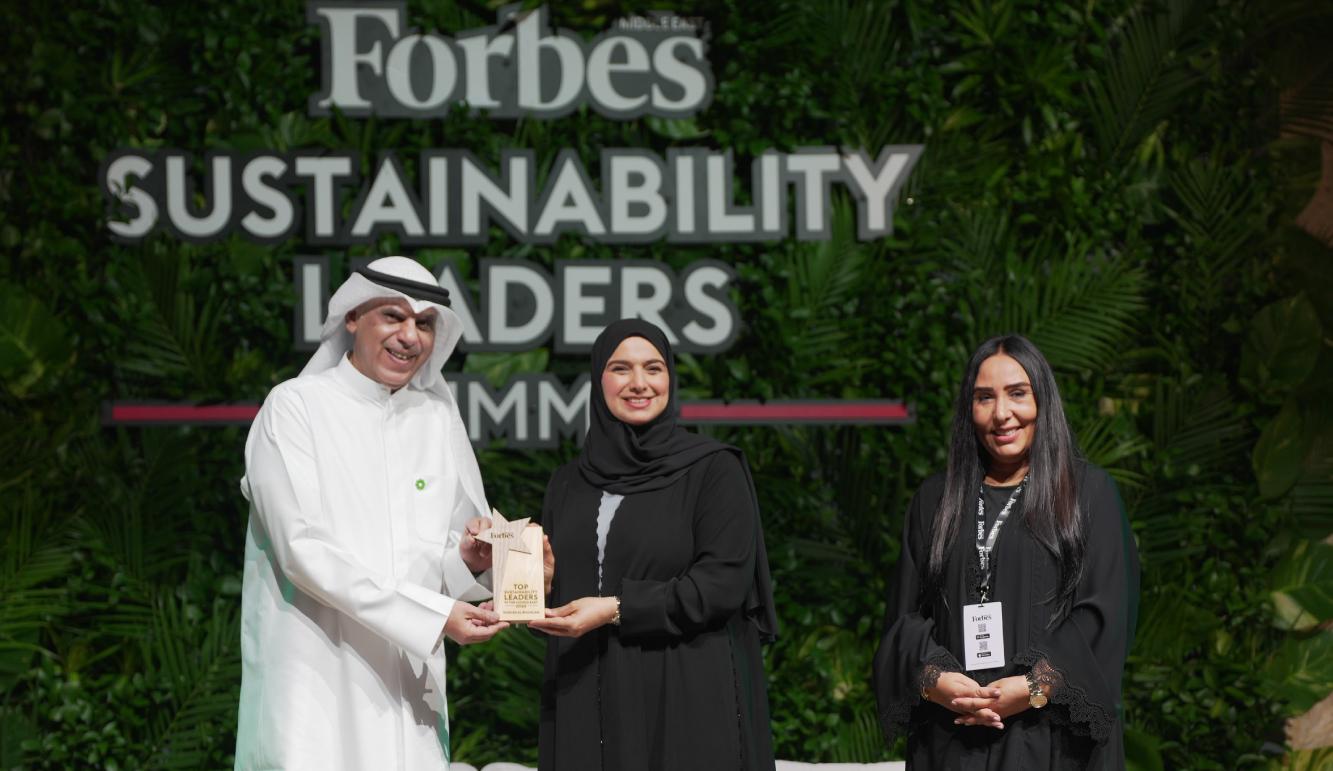
"فوربس" تتوج الرئيس التنفيذي لمجموعة بيت التمويل الكويتي، خالد الشملان، في المركز الأول على مستوى قطاع البنوك في الكويت ضمن "قادة الاستدامة في الشرق الأوسط" 2026
تقديرا لتأثيره البارز ودوره في قيادة جهود الاستدامة في مجموعة بيت التمويل الكويتي، توّجت مجلة "فوربس" الشرق الأوسط، الرئيس التنفيذي لمجموعة بيت التمويل الكويتي، خالد يوسف الشملان، في المركز الأول على مستوى قطاع البنوك في الكويت، والسابع على مستوى الشرق الأوسط، ضمن قائمة مجلة "فوربس" لقادة الاستدامة في الشرق الأوسط لعام 2026. وجاء التتويج خلال حفل جوائز "قادة الاستدامة" الذي عقد في العاصمة الإماراتية أبوظبي تحت رعاية الدكتورة آمنة بنت عبدالله الضحاك، وزيرة التغير المناخي والبيئة في دولة الإمارات العربية المتحدة، وجمع القادة في مجال الاستدامة والتكنولوجيا والتمويل لتعزيز الممارسات الخضراء وتعزيز الاستدامة، حيث تسلّم التكريم بالنيابة عن الشملان، رئيس الالتزام والحوكمة للمجموعة في بيت التمويل الكويتي، مشعل الشايع. وتسلط قائمة قادة الاستدامة لعام 2026 الضوء على المسؤولين التنفيذيين الذين يسهمون في دفع أجندة الاستدامة، ويؤثرون في مسار أبرز الشركات في المنطقة. وتضم 145 مشاركة موزعة على 17 قطاعًا، تشمل: البنوك، والطاقة والمرافق، والشركات العائلية، والخدمات المالية، والأغذية والزراعة، والمناطق الحرة، والرعاية الصحية، والاستثمار والشركات القابضة، والصناعة، والنفط والغاز، والعقارات والإنشاءات، والطاقة المتجددة، والتكنولوجيا والاتصالات، والنقل والخدمات اللوجستية، وصناديق التنمية، وغيرها. وذكرت مجلة "فوربس الشرق الأوسط" ان مجموعة بيت التمويل الكويتي وسّعت استثماراتها في صكوك الاستدامة إلى نحو 2.38 مليار دولار في 2025، بما يعكس الدور القيادي في التمويل المستدام في أسواق التمويل الإسلامي. وأضافت أن حجم استثمارات بيت التمويل الكويتي في الصكوك المستدامة والخضراء ارتفع إلى نحو 1.2 مليار دولار خلال 2025، بنمو سنوي بلغ 30.7 في المئة، مقارنة بـ 2024. وتوزعت هذه الاستثمارات بواقع 44 في المئة في الصكوك المستدامة، و56 في المئة في الصكوك الخضراء. وأشارت المجلة إلى أن بيت التمويل الكويتي وضع في عام 2025 خطة للاستدامة البيئية والاجتماعية والحوكمة (ESG) تستهدف تحقيق الحياد الكربوني لعملياته التشغيلية بحلول عام 2060، مدعومة بخارطة طريق تنفيذية للفترة 2025-2030. ريادة في الاستدامة ويواصل البنك مساهماته في دعم الاستدامة عن طريق استثماراته الناجحة في صكوك الاستدامة والصكوك الخضراء، والحرص على دمج الممارسات المستدامة ضمن عملياته، إلى جانب تبنيه الاستباقي لمبادئ الحوكمة البيئية والاجتماعية وحوكمة الشركات (ESG) كعنصر جوهري في استراتيجيته المؤسسية، وبما يتماشى مع رؤية الكويت 2035 لأهداف التّنمية المستدامة SDG. يذكر أن بيت التمويل الكويتي حصل على تقييم "A" ضمن مؤشر مورغان ستانلي كابيتال إنترناشيونال (MSCI ESG Index) الخاص بالمعايير البيئية والاجتماعية وحوكمة الشركات والذي تصدره "مورغان ستانلي"، وكذلك تم إدراج بيت التمويل الكويتي على مؤشّر الاستدامة العالمي "فوتسي 4 جود "FTSE4Good، وذلك بفضل أدائه الاستثنائي في الممارسات البيئية والاجتماعية والحوكمةESG، والتزامه بالتمويل المستدام. ونجح بيت التمويل الكويتي في الحصول على شهادة الريادة في تصميمات الطاقة والبيئة من الفئة الذهبية (LEED) لعدد من فروعه، ليرتفع بذلك إجمالي الفروع الحاصلة على هذا التصنيف المتميز إلى خمسة فروع منذ أوائل عام 2026. وبالإضافة إلى ذلك، نال بيت التمويل الكويتي عن معرض KFH Auto شهادة تقييم الاستدامة GSAS المستوى الذهبي، ليصبح أول بنك في الكويت ينال هذا الاستحقاق المرموق. كما يواصل جهوده في مجال الاستدامة بالتعاون مع برنامج الأمم المتّحدة الانمائي UNDP. ويواصل تنظيم برنامج "استدامة الأعمال" الأول من نوعه، لعملائه من الشركات الصغيرة والمتوسطة SMEs ، بهدف منحهم ميزة تنافسية لتحقيق تطلعاتهم، والتأكيد على رؤيته لتعزيز التنمية المستدامة، وريادته في تحفيز بيئة ريادة الأعمال. كما يواصل مبادرة "Keep It Green التي تعزّز من حماية البيئة، وتعمل على خفض الانبعاثات الكربونية من أجل غد أكثر استدامة. ويعد بيت التمويل الكويتي أول الجهات التي بدأت تقارير أثر القياس، ويطلق سنويا تقرير الاستدامة، وتقرير البصمة الكربونية، والذي يتضمن معلومات قيمة ورؤى وخططاً مفصلة تسلط الضوء على الحياد الكربوني، وتقليل الآثار السلبية للأنشطة غير المتوائمة مع حماية البيئة خلال السنوات المقبلة بما يتماشى مع المبادرات العالمية لمكافحة تغير المناخ.

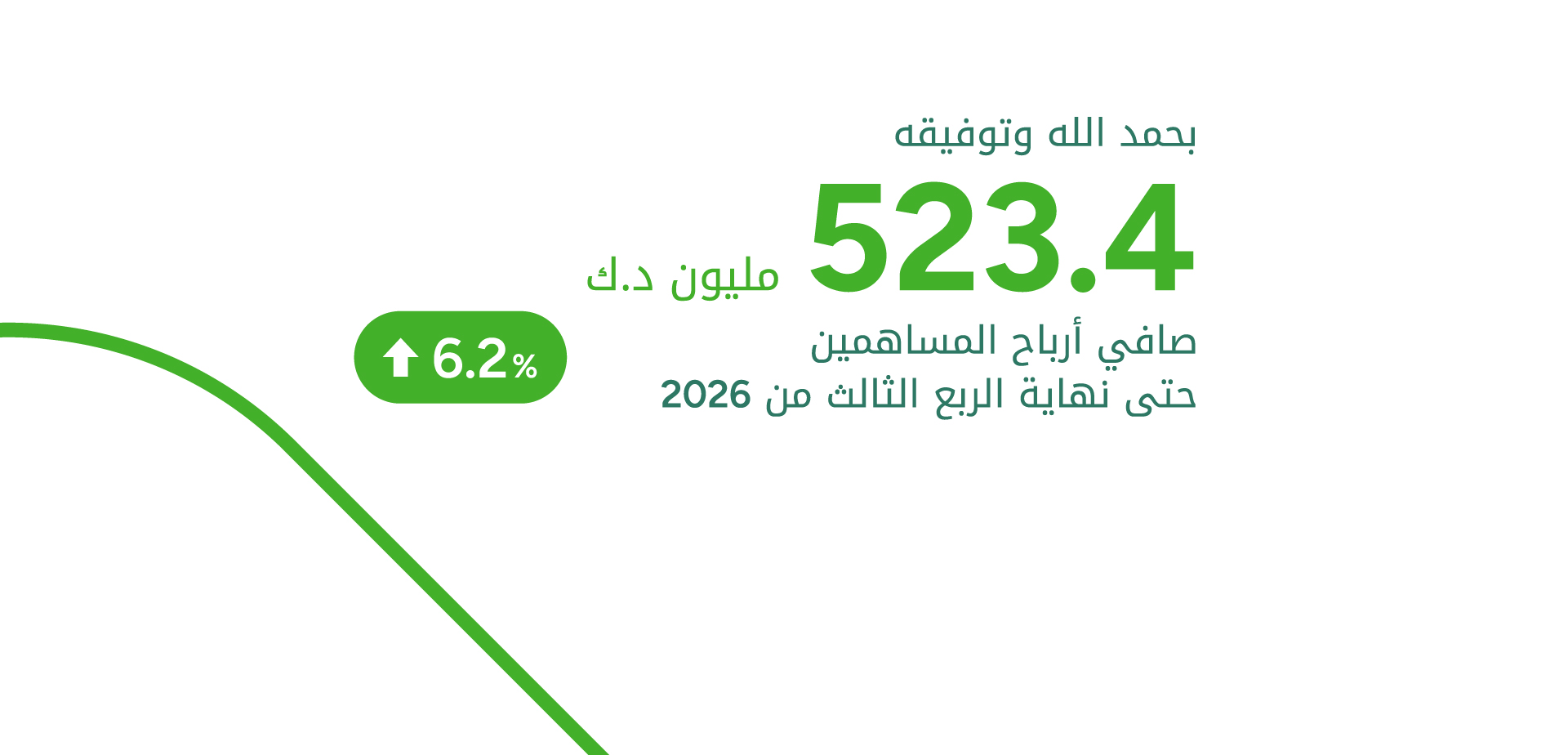
بيت التمويل الكويتي يحقق 523.4 مليون دينار كويتي صافي أرباح للمساهمين حتى نهاية الربع الثالث من 2026
قال رئيس مجلس الإدارة في بيت التمويل الكويتي، حمد عبد المحسن المرزوق، إنه – بفضل الله وتوفيقه – حقق البنك صافي أرباح للمساهمين حتى نهاية الربع الثالث من 2026 بلغ 523.4 مليون دينار كويتي، بنسبة نمو 6.2% مقارنة بنفس الفترة من العام السابق، وهي أعلى أرباح على مستوى القطاع المصرفي في الكويت. وبلغت ربحية السهم 27.56 فلسا حتى نهاية الربع الثالث من 2026، بنسبة نمو 5.4% مقارنة بنفس الفترة من العام السابق. وارتفع صافي إيرادات التمويل حتى نهاية الربع الثالث من 2026 ليصل إلى 989.5 مليون دينار كويتي، بنسبة نمو بلغت 4.8% مقارنة بالفترة ذاتها من العام السابق. كما ارتفع إجمالي إيرادات التشغيل حتى نهاية الربع الثالث من 2026، مدعومًا بنمو جميع الأنشطة الرئيسية، ليبلغ 1,452.2 مليون دينار كويتي، بنسبة نمو بلغت 6.7% مقارنة بالفترة نفسها من العام الماضي. ونتيجة لضبط المصروفات وترشيد النفقات فقد انخفض إجمالي مصروفات التشغيل بنسبة 3.0% مقارنة بالفترة نفسها من العام السابق. وبالتالي، فقد ارتفع صافي إيرادات التشغيل حتى نهاية الربع الثالث من 2026 إلى 1,004.7 مليون دينار كويتي، محققًا نموًا بنسبة 11.7%. ونتيجة للزيادة في اجمالي ايرادات التشغيل وانخفاض اجمالي مصروفات التشغيل فقد تحسنت نسبة التكلفة إلى الإيراد لتبلغ 30.8% حتى نهاية الربع الثالث من 2026، مقارنة بـ 33.9% خلال الفترة المقابلة من العام السابق. وبلغ رصيد مديني التمويل بنهاية الربع الثالث من 2026 نحو 23.4 مليار دينار كويتي، بنسبة نمو 7.5% مقارنة بنهاية العام السابق، كما بلغ إجمالي الموجودات 43.8 مليار دينار كويتي بنهاية الربع الثالث من 2026 بنسبة نمو بلغت 2.4% مقارنة بنهاية العام السابق. وبلغ إجمالي حقوق المساهمين بنهاية الربع الثالث من العام الجاري 5.7 مليار دينار كويتي. كما بلغ رصيد حسابات المودعين بنهاية الربع الثالث من 2026 نحو 22.7 مليار دينار كويتي، بنسبة نمو بلغت 7.8% مقارنة بنهاية العام السابق. وبلغ معدل كفاية رأس المال 17.22%، متجاوزًا المتطلبات الرقابية، وهو ما يعكس متانة القاعدة الرأسمالية للبنك. نجاح الاستراتيجية وقال المرزوق: إن مواصلة بيت التمويل الكويتي تحقيق أداء قوي حتى نهاية الربع الثالث من العام الحالي 2026 تؤكد نجاح الاستراتيجية الموضوعة والقدرة على تحقيق نمو مستدام ومتوازن، وتعزيز كفاءة الأداء والاستفادة المثلى من الموارد والأصول، بما يرسخ قوة المركز المالي ويعزز مكانة البنك في القطاع المصرفي. وأضاف أن استمرار الأداء القوي يؤكد متانة نموذج الأعمال الذي يقوم عليه بيت التمويل الكويتي، ومرونته في التعامل مع المتغيرات الاقتصادية والجيوسياسية، إلى جانب كفاءة إدارة المخاطر والالتزام بأعلى معايير الحوكمة، مشيراً إلى أن النتائج تمثل انعكاساً لنهج استراتيجي واضح يقوم على النمو المسؤول، وتعظيم القيمة للمساهمين والعملاء. بناء قيمة مستدامة وأوضح المرزوق أن استراتيجية المجموعة تنظر إلى المستقبل بمنظور طويل الأجل، وتستهدف بناء قيمة مستدامة وتعزيز تنافسية البنك وقدرته على مواصلة النمو، من خلال الاستثمار في تطوير الأعمال والخدمات، وتسريع التحول الرقمي، ورفع الكفاءة التشغيلية، وتنمية رأس المال البشري. وأكد أن بيت التمويل الكويتي سيواصل تنفيذ خططه الاستراتيجية بثبات، مستنداً إلى قوة مركزه المالي وتنوع أعماله وخبراته المتراكمة، مع المحافظة على نهج النمو المسؤول وتعزيز دوره في دعم الاقتصاد الوطني، بما يرسخ الثقة التي يحظى بها البنك لدى مساهميه وعملائه والمجتمع. تحسن بيئة الأعمال وأشار المرزوق إلى أن التطورات التي تشهدها بيئة الأعمال في دولة الكويت، وما رافقها من خطوات تشريعية وتنظيمية داعمة للنشاط الاقتصادي والمالي مثل قانون التمويل العقاري، وقانون الصكوك، وقبله قانون الاقتراض من احتياطي الأجيال القادمة، وقانون التمويل والسيولة، تمثل عوامل إيجابية لتعزيز قدرة القطاع الخاص والمؤسسات المالية على النمو والمساهمة في مسيرة التنمية الاقتصادية، منوّها بأهمية قانون الصكوك كونه يتيح إضافة أداة تمويل سيادي متوافقة مع الشريعة، ويساهم بتوسيع قاعدة المستثمرين محلياً ودولياً، وبناء منحنى عائد سيادي إسلامي يدعم إصدارات الشركات والمؤسسات المالية مستقبلاً. ريادة في المسؤولية المجتمعية وأكد المرزوق حرص بيت التمويل الكويتي على مواصلة دعم المبادرات والمشاريع الوطنية ذات الأثر الاستراتيجي، بما يعزز التكامل بين مؤسسات الدولة والقطاع الخاص ويسهم في خدمة المصلحة الوطنية ودعم مسيرة التنمية المستدامة في الكويت، منوها بتنفيذ العديد من المبادرات المجتمعية والوطنية الاستراتيجية مثل دعم المبادرة الوطنية التي أطلقها الصندوق الكويتي للتنمية الاقتصادية العربية لإنشاء "صندوق الكويت للاستجابة الطارئة"، عبر مساهمة مالية بقيمة 13 مليون دولار، وكذلك المساهمة بمبلغ إضافي بقيمة 6 ملايين دولار لإصلاح محطات الكهرباء المتضررة. وأكد ان جهود بيت التمويل الكويتي في العمل المجتمعي حظيت بتقدير عالمي مرموق، حيث نال البنك جائزة "أفضل بنك إسلامي للمسؤولية الاجتماعية في العالم لعام 2026" من مجلة غلوبل فايننس العالمية تتويجا لجهوده الإستثنائية وبصمته الواضحة وريادته في مجال المسؤولية الاجتماعية في الأسواق والدول التي يعمل بها. متانة نموذج الأعمال من جانبه، قال الرئيس التنفيذي لمجموعة بيت التمويل الكويتي، خالد يوسف الشملان: إن الأداء القوي الذي حققه البنك حتى نهاية الربع الثالث من العام الحالي 2026، وما صاحبه من استمرار في تحقيق نمو في الأرباح، يؤكد الكفاءة التشغيلية ومتانة نموذج أعمال المجموعة وقدرتها على تحقيق نتائج قوية ومستدامة، رغم الظروف الاقتصادية والجيوسياسية التي تمر بها المنطقة والكويت، مدعوماً بكفاءة تشغيلية عالية ومرونة في التعامل مع متغيرات الأسواق. تنوع مصادر الايرادات وأضاف الشملان أن تنوع مصادر الإيرادات والتوزيع الجغرافي لأعمال المجموعة، التي تمتد إلى 10 دول حول العالم بشبكة فروع تزيد على 600 فرع، يمثل أحد العوامل الداعمة لاستقرار الأداء وتعزيز الإيرادات، إلى جانب استمرار البنك في تطوير قدراته التمويلية والائتمانية وتلبية احتياجات العملاء من الأفراد والشركات. انجازات رقمية نوعية وأكد أن بيت التمويل الكويتي يواصل تحقيق الانجازات النوعية في الخدمات المصرفية الرقمية، مشيراً إلى استمرار الاستثمار في التكنولوجيا والابتكار، بهدف الارتقاء بتجربة العملاء، ورفع الكفاءة التشغيلية، وتعزيز القدرة على مواكبة التطورات المتسارعة في القطاع المصرفي. ولفت إلى أن البنك قدّم نموذجاً متكاملاً للتحول الرقمي يستند إلى رؤية استراتيجية واضحة تركز على العميل وتحقيق نتائج تشغيلية ملموسة، لافتاً إلى تنفيذ أكثر من 600 مليون معاملة رقمية في عام واحد، وتوفير أكثر من 200 خدمة رقمية متكاملة عبر KFHonline، الأمر الذي عزز مكانة الخدمات الرقمية كخيار مصرفي رئيسي للعملاء. أداء متميز ولفت إلى أن الأداء المتميز للبنك انعكس كذلك في مواصلة حصد التقديرات والجوائز الدولية، ومن أبرزها تصنيفه في المركز الأول كأفضل بنك أداء في الكويت ضمن قائمة "أقوى 100 بنك عربي" لعام 2026 الصادرة عن مجلة The Banker، إلى جانب حصول المجموعة جوائز "يوروموني" في مجالات إدارة الثروات والحوكمة البيئية والاجتماعية والخدمات المصرفية الرقمية، عدا عن جائزة "أفضل بنك اسلامي في العالم" من مجلة غلوبل فايننس العالمية، و"أفضل بنك رقمي في الكويت" من MEED، إلى جانب العديد من التقديرات العالمية التي تجسد مكانة البنك الرائدة عالميا. شكر وثناء وأعرب الشملان عن تقديره لدعم مجلس الادارة، مثمنا دور الجهات الرقابية في دعم القطاع المصرفي. كما أشاد بجهود الادارة التنفيذية وجميع الموظفين وكافة الشركاء وأصحاب المصلحة، لدورهم الأساسي في تلبية تطلعات المساهمين والعملاء والمحافظة على ريادة بيت التمويل الكويتي وتعزيز مكانته محليا واقليميا وعالميا.
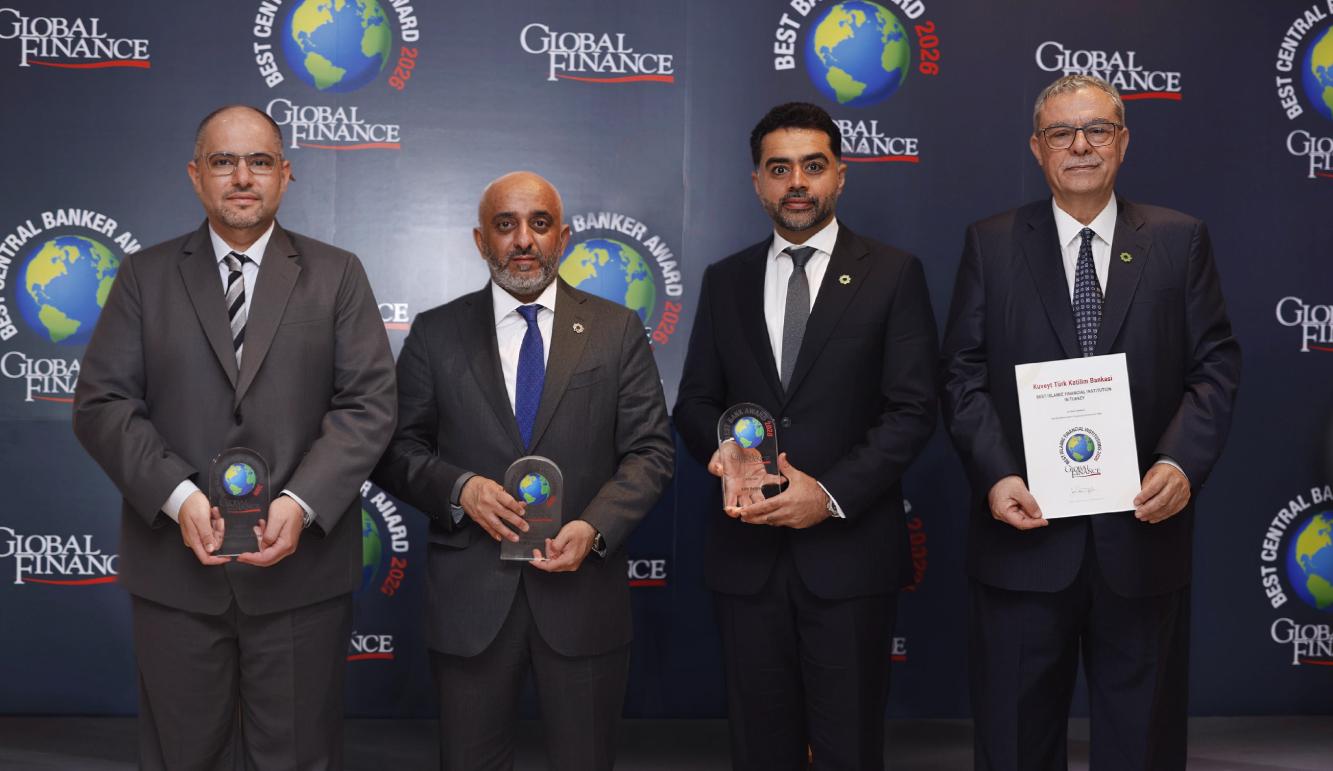
"غلوبل فايننس" تتوّج بيت التمويل الكويتي بجائزة "أفضل بنك إسلامي في العالم" لعام 2026
تُوّجت مجموعة بيت التمويل الكويتي بـ 7 جوائز مرموقة من مجلة "غلوبل فايننس" العالمية ضمن النسخة التاسعة عشرة من الجوائز السنوية لأفضل المؤسسات المالية الإسلامية في العالم للعام 2026، وذلك في تأكيد جديد على ريادة المجموعة ومكانتها الفريدة في قطاع التمويل الإسلامي على مستوى العالم. والجوائز هي: • أفضل بنك إسلامي في العالم • أفضل بنك إسلامي للخدمات المصرفية للشركات في العالم • أفضل بنك إسلامي للمسؤولية الاجتماعية في العالم • أفضل مزود للتمويل الإسلامي للمشاريع في العالم • أفضل بنك إسلامي في الكويت • أفضل بنك إسلامي في البحرين (بيت التمويل الكويتي – البحرين) • أفضل بنك إسلامي في تركيا (بيت التمويل الكويتي – تركيا) وتعد هذه الجوائز ثمرة لاستراتيجية واضحة ترتكز على التحول الرقمي المدفوع بالذكاء الاصطناعي، وتعزيز التكامل على مستوى المجموعة، والتركيز على العميل، كما تمثل الجوائز حافزا لمواصلة تحقيق المزيد من النجاحات وتعزيز الدور الريادي للمؤسسة في الصناعة المالية الإسلامية عالميا. وتسلم الجوائز رئيس الخزانة - الكويت في بيت التمويل الكويتي، أحمد السميط، ورئيس العلاقات العامة والإعلام للمجموعة في بيت التمويل الكويتي، يوسف عبدالله الرويح، والرئيس التنفيذي لبيت التمويل الكويتي- تركيا أفق أويان، ونائب الرئيس التنفيذي للمجموعة – الخزينة والاستثمار في بيت التمويل الكويتي- البحرين، بسام العلي، وذلك خلال حفل الجوائز الذي أقيم على هامش الاجتماعات السنوية لصندوق النقد الدولي ومجموعة البنك الدولي لعام 2026، في العاصمة التايلاندية بانكوك. ويأتي هذا التقدير نتيجة الجهود المتواصلة التي يبذلها البنك في تعزيز مبادئ الاستدامة والحوكمة والابتكار الرقمي، إلى جانب تحقيق أداء مالي قوي ونمو متوازن ومستدام في مختلف الأسواق التي يعمل بها. وتأتي جائزة "أفضل مؤسسة مالية اسلامية في العالم" لعام 2026 تقديرا لريادة بيت التمويل الكويتي في العمل المصرفي الإسلامي وتميّزه في تقديم خدمات ومنتجات مالية مبتكرة ومتوافقة مع أحكام الشريعة الإسلامية، فيما تعكس النجاح الذي حققه في ترسيخ التزامه بتنفيذ استراتيجيته الرامية إلى تحقيق نمو مستدام، والقدرة على التكيف مع مختلف المتغيرات الاقتصادية والتحديات التشغيلية بمختلف الأسواق، مما يمهد الطريق لتحقيق هدف الانضمام إلى قائمة أكبر 100 بنك في العالم. وعن جوائز "أفضل بنك إسلامي في الكويت"، و"أفضل بنك إسلامي في البحرين والتي حصل عليها (بيت التمويل الكويتي – البحرين)، و"أفضل بنك إسلامي في تركيا" والتي حصل عليها (بيت التمويل الكويتي – تركيا) ، فتؤكد تميز وحدات المجموعة وتفوقها في الأسواق التي تعمل بها، وفق استراتيجية موحدة ومرنة تتناسب مع طبيعة كل سوق. ويتمتع بيت التمويل الكويتي بمكانة رائدة ككيان اقتصادي عالمي يعمل عبر شبكة تضم فروعا في 10 دول، ويتمتع بملاءة مالية قوية وأداء تنافسي انعكس في تحقيق أعلى الأرباح على مستوى القطاع المصرفي والسوق الكويتي، الى جانب تصدره كافة بنوك وشركات القطاع الخاص الكويتي في القيمة السوقية والتي بلغت رقما قياسيا بتجاوزها حاجز الـ15 مليون دينار. وفيما يتعلق بجائزة "أفضل بنك إسلامي للخدمات المصرفية للشركات في العالم"، فتعكس الثقة العالمية المتزايدة بقدرات بيت التمويل الكويتي وتميزه في بناء شراكات استراتيجية طويلة الأمد مع عملائه الشركات، وتوفير حلول مالية متقدمة تدعم توسع أعمالهم وتعزز قدرتهم التنافسية في الأسواق المحلية والدولية. ويواصل بيت التمويل الكويتي تحقيق أداء استثنائي في مجال الخدمات المصرفية للشركات، مدعوماً بنمو استراتيجي وريادة راسخة، إلى جانب الاستمرار في الابتكار في حلول التمويل الإسلامي، وقيادة العديد من الصفقات التمويلية البارزة، التي أسهمت في تعزيز دوره المحوري في دعم مسيرة التنمية الاقتصادية. وحول جائزة "أفضل مزود للتمويل الإسلامي للمشاريع في العالم"، فهي تؤكد دور بيت التمويل الكويتي الرائد في تمويل المشاريع الكبرى ومساهماته البارزة في تمويل قطاعات استراتيجية متنوعة في الكويت والمنطقة، حيث يعد البنك شريكاً رئيسياً في تقديم التمويل لمشاريع قطاع النفط والغاز والبنى التحتية والتطوير العمراني وقطاع الخدمات وغيرها من القطاعات الحيوية. ويقدم البنك خدمات مصرفية متكاملة للشركات، تعتمد على التحول الرقمي، والمرونة التمويلية تلبي احتياجات مختلف القطاعات الاقتصادية وتسهم في دعم التنمية المستدامة، مع تقديم تجربة مصرفية استثنائية للعملاء من الشركات من خلال المنصة الالكترونية eCorp، والتي شهدت إقبالاً لافتاً في معدلات الاستخدام، لاسيما بعد إطلاق النسخة المطورة من الخدمات الإلكترونية وتطبيق الهواتف الذكية، كما يقوم البنك بالاضطلاع بدوره كشريك استرتيجي في دعم المشروعات الصغيرة والمتوسطة، والتي انطلقت بتمويل من البنك. وأشار رئيس العلاقات العامة والإعلام للمجموعة في بيت التمويل الكويتي، يوسف عبدالله الرويح، إلى أن جائزة "أفضل بنك إسلامي للمسؤولية الاجتماعية في العالم لعام 2026" تعكس نجاح جهوده الإستثنائية وتؤكد بصمته الواضحة وريادته في مجال المسؤولية الاجتماعية في الأسواق والدول التي يعمل بها، وتجسد رؤيته للمسؤولية الاجتماعية كركيزة استراتيجية في نموذج أعماله بما ينعكس على ترسيخ مكانته كمؤسسة مالية رائدة تجمع بين النمو الاقتصادي والأثر المجتمعي المستدام. وأوضح الرويح أن الفوز بجائزة "أفضل بنك إسلامي للمسؤولية الاجتماعية على مستوى العالم" يؤكد ريادة البنك وتميزه في دمج المسؤولية الاجتماعية ضمن نموذج أعماله من خلال مبادرات مؤثرة في التنمية المجتمعية، ودعم التعليم والصحة، وتمكين الشباب، وريادة الأعمال، والمحافظة على البيئة، وتمكين المرأة، ودعم المهارات الرقمية لدى الأطفال والشباب، والعمل التطوعي، إلى جانب تطبيق أفضل ممارسات الحوكمة البيئية والاجتماعية والمؤسسية، وتنفيذ مبادرات توعوية ومجتمعية لها اثر مستدام ومنسجمة مع الأهداف التنموية، ترسخ مكانته كنموذج يحتذى به ورائد في المسؤولية الاجتماعية. وأكد الرويح ان هذا التقدير يعد إضافة جديدة إلى سجل إنجازات بيت التمويل الكويتي، ويشكل دافعاً لمواصلة تطوير المبادرات المجتمعية وتعزيز الشراكات الهادفة، بما يسهم في تحقيق قيمة مستدامة للمجتمع. وذكر الرويح ان بيت التمويل الكويتي يواصل الاضطلاع بدور وطني ريادي في دعم البنية التحتية الاجتماعية وتعزيز رفاه المجتمع وجودة الحياة، من خلال مبادرات استراتيجية واستثمارات ضخمة في مجال المسؤولية الاجتماعية. وتعكس هذه الالتزامات طويلة الأمد نهجا مستداما يمتد إلى ما هو أبعد من المفهوم التقليدي للمسؤولية الاجتماعية للشركات، ومن أبرز هذه المبادرات الاجتماعية الاستراتيجية: - دعم "صندوق الكويت للاستجابة الطارئة"، عبر مساهمة مالية بقيمة 13 مليون دولار، وكذلك المساهمة بمبلغ إضافي بقيمة 6 ملايين دولار لإصلاح محطات الكهرباء المتضررة. - المساهمة بأكثر من 61 مليون دينار لسداد مديونيات الغارمين المختلفة. - المساهمة في إعادة إعمار المنطقة المتضررة في سوق المباركية بقيمة تقارب 8 ملايين دينار. - المساهمة بقيمة 20 مليون دينار كويتي لإنشاء 15 مركزاً للإسعاف. - المساهمة في الحصة الأكبر لصندوق دعم المجهود الحكومي خلال أزمة كورونا وقيمته 10 ملايين دينار. - دعم مبادرة بيئية مستدامة لتطوير ساحة الوطنية. - إنشاء وتجهيز الجناح العاشر في مركز علاج الإدمان استكمالاً لمبادرة البنك في إنشاء المركز عام 2005. - تقديم 20 مليون دولار أمريكي لجمعية الهلال الأحمر الكويتي لدعم جهود الإغاثة لمنكوبي الزلزال في تركيا وسوريا. - برامج تعاون مختلفة مع جمعية الهلال الأحمر الكويتي، وبرنامج الأمم المتحدة الانمائي UNDP، ومفوضية الأمم المتحدة لشؤون اللاجئين. - مواصلة الدور الرائد في تقديم المساهمات المجتمعية لمؤسسة الكويت للتقدم العلمي، ولبرنامج دعم العمالة الوطنية، ولمعهد الدراسات المصرفية، وغير ذلك من مبادرات مجتمعية مختلفة أكدت ريادة بيت التمويل الكويتي الاجتماعية. وبدوره، قال جوزيف دي جيارابوتو، المؤسس ومدير تحرير مجلة غلوبل فايننس: "مع استمرار التمويل الإسلامي في نموه المتسارع، تركز المؤسسات الرائدة على التحول الرقمي، والابتكار في المنتجات، والتوسع في خدمات الصيرفة". وأضاف: "تُكرّم الجوائز السنوية لمجلة "غلوبل فايننس" المؤسسات التي تعمل على تحسين الكفاءة، واستقطاب عملاء جدد، وتقديم أفضل الخدمات لعملائها." عن مجلة "غلوبل فايننس" تجدر الإشارة إلى أن مجلة "غلوبل فايننس" التي تتخذ من نيويورك مقراً لها، تأسست عام 1987 وتبلغ توزيعاتها 50,000 نسخة، فضلاً عن أنها منتشرة في 185 دولة حول العالم، وتخاطب المجلة نخبة من كبار المسؤولين في الشركات والمؤسسات المالية، ممن يتولون زمام اتخاذ قرارات الاستثمار والتخطيط الاستراتيجي. ويوفر الموقع الرسمي للمجلة (GFMag.com) تحليلات ومقالات هي خلاصة خبرة عمرها 39 عاماً في الأسواق المالية الدولية. معايير استحقاق الجوائز وتستند مجلة "غلوبل فايننس" في اختيارها للفائزين بهذه الجوائز إلى مجموعة من المعايير الدقيقة تشمل نمو الأصول، والربحية، والانتشار الجغرافي، والعلاقات الاستراتيجية، وتطوير الأعمال الجديدة، والابتكار في المنتجات، إلى جانب السمعة المؤسسية، ومستويات رضا العملاء، وآراء المحللين والمتخصصين العاملين في القطاع. وتم إجراء جميع عمليات الاختيار من قبل الفريق التحريري لمجلة "غلوبل فايننس" بعد مشاورات موسّعة مع مصرفيين، وتنفيذيين في مجال تمويل الشركات، ومحللين حول العالم، مع الأخذ في الاعتبار طلبات المشاركة المقدّمة من المؤسسات المالية الإسلامية.